








Search engines discover billions of web pages every day, but they don’t automatically know when you’ve published a new article or updated existing content. Instead, they rely on various signals to find, crawl, and index pages. One of the most effective tools for helping search engines understand your website is an XML sitemap.
Whether you run a personal blog, a business website, or a large e-commerce store, an XML sitemap acts as a roadmap that points search engine crawlers toward your important pages. While it doesn’t guarantee that every page will be indexed, it significantly improves the chances that search engines can discover your content quickly and efficiently.
In this guide, you’ll learn what XML sitemaps are, how they work, why they matter for SEO, and how to create and submit one for your website.
What Is an XML Sitemap?
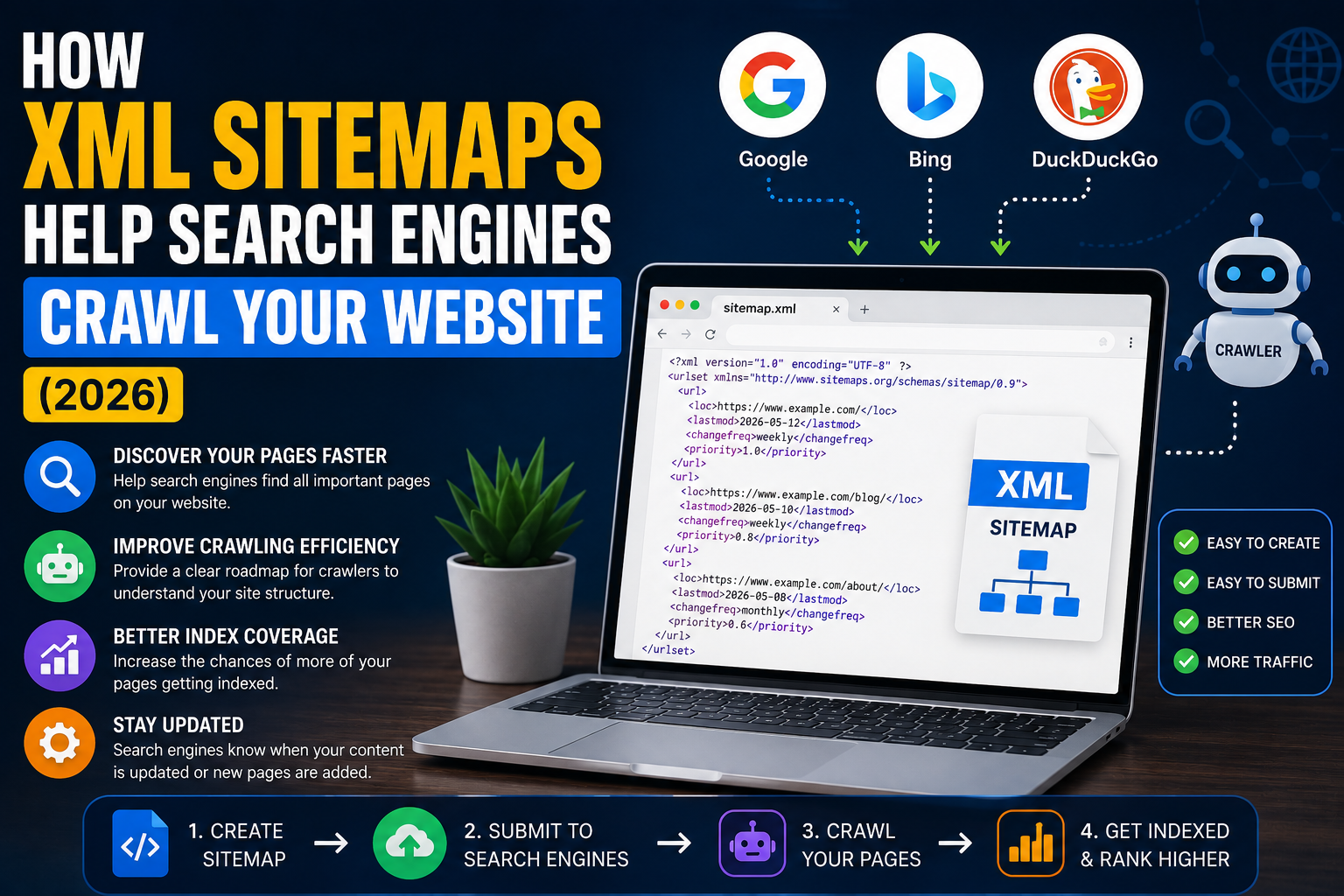
An XML sitemap is a file that lists the important URLs on your website in a structured format that search engines can easily understand.
Unlike the navigation menu visitors use, an XML sitemap is designed specifically for search engine crawlers. It provides information about the pages you want search engines to crawl and index.
A typical sitemap contains details such as:
- Page URLs
- Last modification date
- Update frequency (optional)
- Relative importance (optional)
Most websites automatically generate this file using their content management system or an SEO plugin.
Why XML Sitemaps Matter
Without a sitemap, search engines usually discover pages by following links from other websites or by crawling links within your own site.
While this works well for many websites, it isn’t always efficient.
An XML sitemap provides crawlers with a direct list of your important pages, helping them understand your site’s structure more quickly.
This becomes especially useful if:
- Your website is new.
- You publish content regularly.
- Your site contains thousands of pages.
- Some pages have few internal links.
- Your website includes images or videos that should be indexed.
How Search Engines Use XML Sitemaps
When a search engine visits your sitemap, it reads the list of URLs and decides which pages should be crawled.
The crawler may compare the sitemap with its existing index to determine whether:
- New pages have been published.
- Existing pages have changed.
- Previously indexed pages have been removed.
If updates are detected, the crawler schedules those pages for crawling based on its own algorithms and available crawl resources.
It’s important to understand that a sitemap is a recommendation—not a command. Search engines still decide which pages to crawl and index.
XML Sitemap vs HTML Sitemap
Many people confuse XML sitemaps with HTML sitemaps, but they serve different purposes.
XML Sitemap
- Created for search engines.
- Lists URLs in XML format.
- Helps crawlers discover content.
- Usually hidden from visitors.
HTML Sitemap
- Created for website visitors.
- Displays clickable links.
- Improves user navigation.
- Can also strengthen internal linking.
Many websites benefit from having both.
Benefits of XML Sitemaps
Faster Content Discovery
When you publish a new article, search engines may discover it sooner if it’s included in your sitemap.
This can reduce the time between publishing and crawling.
Better Crawling Efficiency
Large websites often contain thousands of pages.
A sitemap helps crawlers focus on valuable content rather than spending time exploring unnecessary URLs.
Improved Index Coverage
Although sitemaps don’t guarantee indexing, they make it easier for search engines to locate pages that deserve consideration.
Supports Rich Media
Image and video sitemaps can provide additional information that helps search engines understand multimedia content.
What Should Be Included?
Your sitemap should contain only pages you want search engines to index.
Examples include:
- Blog posts
- Category pages
- Product pages
- Service pages
- Landing pages
Avoid including:
- Duplicate URLs
- Admin pages
- Login pages
- Search result pages
- Thank-you pages
- Noindex pages
Keeping your sitemap clean improves its usefulness.
Where Is the Sitemap Located?
Many websites place the sitemap at:
https://example.com/sitemap.xmlWordPress SEO plugins may generate:
https://example.com/sitemap_index.xmlLarge websites often split their sitemap into multiple files managed by a sitemap index.
XML Sitemaps and WordPress
WordPress automatically creates a basic XML sitemap in modern versions.
Popular SEO plugins can expand this functionality by allowing you to:
- Exclude unwanted pages
- Include custom post types
- Generate image sitemaps
- Generate news sitemaps
- Organize multiple sitemap files
This gives website owners more control over what search engines discover.
Submitting Your Sitemap
Creating a sitemap is only the first step.
You should also submit it through webmaster tools offered by search engines.
Submitting your sitemap allows search engines to access the latest version whenever your content changes.
Many website owners also include the sitemap location inside their robots.txt file, making it easier for crawlers to find.
Common XML Sitemap Mistakes
Several mistakes can reduce the effectiveness of your sitemap.
Including Broken Links
URLs returning 404 errors shouldn’t appear.
Including Redirects
Only list the final destination URL.
Listing Noindex Pages
Pages blocked from indexing don’t belong in the sitemap.
Forgetting Updates
Outdated sitemaps can slow content discovery.
Automatic sitemap generation helps avoid this problem.
Including Duplicate Content
Only canonical versions of pages should appear.
Do XML Sitemaps Improve Rankings?
Not directly.
An XML sitemap isn’t a ranking factor.
However, it supports SEO by helping search engines discover and crawl your content more efficiently.
Better crawling can lead to better index coverage, which increases the opportunity for your pages to appear in search results.
Best Practices
For the best results:
- Keep your sitemap updated automatically.
- Include only valuable pages.
- Remove broken URLs.
- Use canonical URLs.
- Submit your sitemap after launching a website.
- Monitor indexing reports regularly.
- Avoid unnecessary duplicate pages.
Following these practices helps search engines understand your website more effectively.
Frequently Asked Questions
Do all websites need an XML sitemap?
Most websites benefit from having one, especially those that publish content regularly or contain many pages.
Can Google find pages without a sitemap?
Yes. Search engines can discover pages through internal links and backlinks, but a sitemap makes discovery more efficient.
How often should a sitemap update?
Whenever your website publishes, removes, or significantly updates content.
Most CMS platforms and SEO plugins update sitemaps automatically.
Does a sitemap guarantee indexing?
No.
Search engines decide which pages to index based on quality, relevance, and other ranking signals.
Should I include every page?
No.
Only include pages that you want search engines to crawl and index.
Conclusion
An XML sitemap is one of the simplest yet most valuable technical SEO tools available. It helps search engines understand your website’s structure, discover new content more efficiently, and prioritize important pages during crawling.
While it won’t improve rankings on its own, a properly maintained sitemap supports better crawl efficiency and index coverage, making it easier for search engines to keep your content up to date in their indexes.
Whether you manage a small blog or a large website, maintaining an accurate XML sitemap should be part of your overall SEO strategy in 2026.